# Prometheus

Integrate open-appsec with [Prometheus](https://prometheus.io/) to collect and monitor key metrics related to WAF performance and behavior.

{% hint style="warning" %}
Prometheus integration is currently in **beta**. Features and behavior may change in future releases.
{% endhint %}

## Configuration

#### Prerequisites

* Access to a SaaS tenant on [my.openappsec.io](https://my.openappsec.io)
* An open-appsec Agent connected to a **centrally managed** Profile
  * If you don't have an agent see instructions on how to get started [here](https://docs.openappsec.io/getting-started).
  * If the agent is running as a container, ensure Prometheus port `7465` is open.
* Prometheus Server

#### Instructions Centrally managed mode:

1. In the Web UI, go to the **Profiles** page
2. Click the profile assigned to your agent and switch to **Advanced** tab
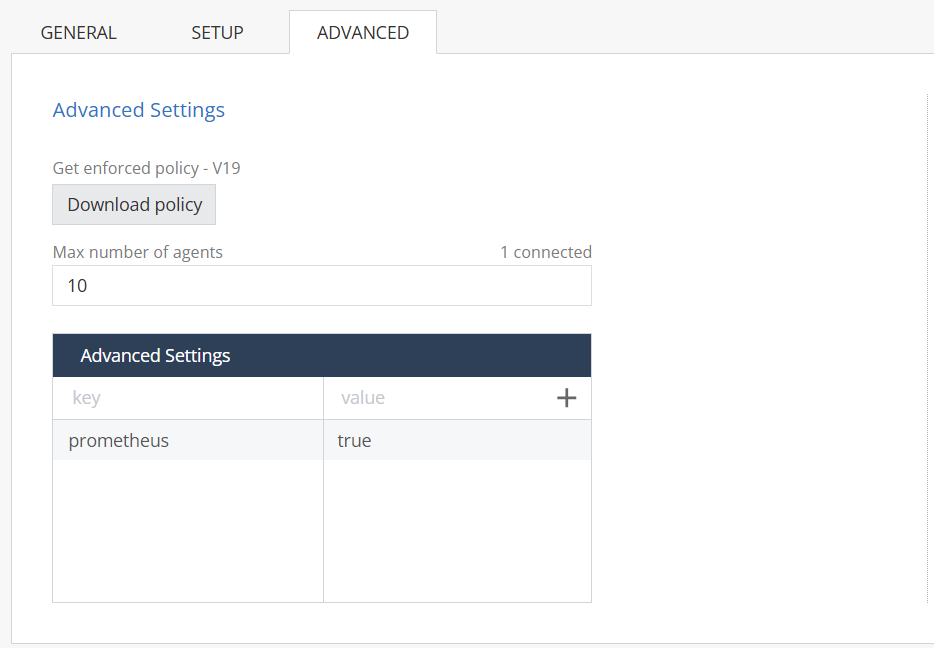
3. Under **Advanced Settings**, add:
   * **Key:** `prometheus`
   * **Value:** `true`
4. Click **Enforce Policy** to apply changes

<figure><img src="https://1225393248-files.gitbook.io/~/files/v0/b/gitbook-x-prod.appspot.com/o/spaces%2FNcZmX14M2KdTBrq9EOnI%2Fuploads%2FgpIlgmc9xdMOds373dCI%2Fimage.png?alt=media&#x26;token=d7bffbf8-8ac4-460c-99cc-224040dbbc16" alt=""><figcaption></figcaption></figure>

4. Add a Job in your Prometheus Server configure the agent IP and Port, see example:&#x20;

```
scrape_configs:
  - job_name: 'openappsec'
    static_configs:
      - targets: ['<agent-ip>:7465']
```

#### Instructions locally managed mode:

1. Enable Prometheus Metrics:

**Linux:**

To enable Prometheus metrics collection, set the following environment variable **before running the installation script**:

```bash
export PROMETHEUS=true
```

**Docker (`docker-compose.yml`)**

Add the environment variable to your service definition:

```yaml
services:
  open-appsec-agent:
    image: <agent-image>
    environment:
      - PROMETHEUS=true
```

**Kubernetes:**&#x20;

```
env:
  PROMETHEUS: "true"

```

2. Add a Job in your Prometheus Server configure the agent IP and Port, see example:&#x20;

```
scrape_configs:
  - job_name: 'openappsec'
    static_configs:
      - targets: ['<agent-ip>:7465']
```

#### Disabling Prometheus

If you need to disable Prometheus after installation:

1. Edit the configuration file:

   ```bash
   sudo vi /etc/cp/conf/environment-details.cfg
   ```
2. Locate the `PROMETHEUS` entry and change its value from:

   ```bash
   PROMETHEUS=true
   ```

   to:

   ```bash
   PROMETHEUS=false
   ```
3. Restart the agent.

{% hint style="info" %}
Disabling Prometheus is only effective **about 30 minutes after the initial installation**.
{% endhint %}

## Supported Parameters

<table><thead><tr><th width="375">Display Name</th><th>Type</th><th>Description</th></tr></thead><tbody><tr><td>nano_service_restarts_counter</td><td>LastReportedValue</td><td>watchdog process restart counter</td></tr><tr><td>total_requests_counter</td><td>Counter</td><td>total requests</td></tr><tr><td>unique_sources_counter</td><td>Counter</td><td>sources</td></tr><tr><td>requests_blocked_by_force_and_exception_counter</td><td>Counter</td><td>override: force exception and force block</td></tr><tr><td>requests_blocked_by_waf_counter</td><td>Counter</td><td>WAF blocked requests</td></tr><tr><td>requests_blocked_by_open_api_counter</td><td>Counter</td><td>API blocked requests</td></tr><tr><td>requests_blocked_by_bot_protection_counter</td><td>Counter</td><td>bot protection blocked requests</td></tr><tr><td>requests_threat_level_info_and_no_threat_counter</td><td>Counter</td><td>requests identified as info threat + none threat</td></tr><tr><td>requests_threat_level_low_counter</td><td>Counter</td><td>request identified as low threat</td></tr><tr><td>requests_threat_level_medium_counter</td><td>Counter</td><td>request identified as medium threat</td></tr><tr><td>requests_threat_level_high_counter</td><td>Average</td><td>request identified as high threat</td></tr><tr><td>post_requests_counter</td><td>Counter</td><td>post requests</td></tr><tr><td>get_requests_counter</td><td>Counter</td><td>get requests</td></tr><tr><td>put_requests_counter</td><td>Counter</td><td>put requests</td></tr><tr><td>patch_requests_counter</td><td>Counter</td><td>patch requests</td></tr><tr><td>delete_requests_counter</td><td>Counter</td><td>delete requests</td></tr><tr><td>other_requests_counter</td><td>Counter</td><td>other requests</td></tr><tr><td>2xx_status_code_responses_counter</td><td>Counter</td><td>response 2xx</td></tr><tr><td>4xx_status_code_responses_counter</td><td>Counter</td><td>response 4xx</td></tr><tr><td>5xx_status_code_responses_counter</td><td>Counter</td><td>response 5xx</td></tr><tr><td>requests_time_latency_average</td><td>Average</td><td>average latency</td></tr><tr><td>sql_injection_attacks_type_counter</td><td>Counter</td><td>SQL Injection</td></tr><tr><td>vulnerability_scanning_attacks_type_counter</td><td>Counter</td><td>Vulnerability Scanning</td></tr><tr><td>path_traversal_attacks_type_counter</td><td>Counter</td><td>Path Traversal</td></tr><tr><td>ldap_injection_attacks_type_counter</td><td>Counter</td><td>LDAP Injection</td></tr><tr><td>evasion_techniques_attacks_type_counter</td><td>Counter</td><td>Evasion Techniques</td></tr><tr><td>remote_code_execution_attacks_type_counter</td><td>Counter</td><td>Remote Code Execution</td></tr><tr><td>xml_extern_entity_attacks_type_counter</td><td>Counter</td><td>XML External Entity</td></tr><tr><td>cross_site_scripting_attacks_type_counter</td><td>Counter</td><td>Cross Site Scripting</td></tr><tr><td>general_attacks_type_counter</td><td>Counter</td><td>General</td></tr><tr><td>all_assets_counter</td><td>LastReportedValue</td><td>number of protected assets</td></tr><tr><td>prevent_action_matches_counter</td><td>Counter</td><td>prevent engine matches</td></tr><tr><td>detect_action_matches_counter</td><td>Counter</td><td>detect engine matches</td></tr><tr><td>ignore_action_matches_counter</td><td>Counter</td><td>ignore engine matches</td></tr><tr><td>cpu_usage_percentage_max</td><td>Max</td><td>Max CPU usage</td></tr><tr><td>cpu_usage_percentage_average</td><td>Average</td><td>Average CPU usage</td></tr><tr><td>cpu_usage_percentage_last_value</td><td>LastReportedValue</td><td>last CPU usage reported</td></tr><tr><td>service_virtual_memory_size_kb_max</td><td>Max</td><td>max service virtual memory size</td></tr><tr><td>service_virtual_memory_size_kb_min</td><td>Min</td><td>min service virtual memory size</td></tr><tr><td>service_virtual_memory_size_kb_average</td><td>Average</td><td>average service virtual memory size</td></tr><tr><td>service_physical_memory_size_kb_max</td><td>Max</td><td>max service RSS memory size</td></tr><tr><td>service_physical_memory_size_kb_min</td><td>Min</td><td>min service RSS memory size</td></tr><tr><td>service_physical_memory_size_kb_average</td><td>Average</td><td>average service RSS memory size</td></tr><tr><td>general_total_used_memory_max</td><td>Max</td><td>max general total memory size</td></tr><tr><td>general_total_used_memory_min</td><td>Min</td><td>min general total memory size</td></tr><tr><td>general_total_used_memory_average</td><td>Average</td><td>average  general total memory size</td></tr></tbody></table>


---

# Agent Instructions: Querying This Documentation

If you need additional information that is not directly available in this page, you can query the documentation dynamically by asking a question.

Perform an HTTP GET request on the current page URL with the `ask` query parameter:

```
GET https://docs.openappsec.io/prometheus.md?ask=<question>
```

The question should be specific, self-contained, and written in natural language.
The response will contain a direct answer to the question and relevant excerpts and sources from the documentation.

Use this mechanism when the answer is not explicitly present in the current page, you need clarification or additional context, or you want to retrieve related documentation sections.